---
title: How do I resize images for my listing?
description: There are many free apps and online tools for resizing images. Here's one that we use...
---
[Skip to content](https://help.northshoremums.com.au/knowledge/how-to-resize-images#main-content)
English
Show submenu for translations
[Contact us](https://help.northshoremums.com.au/knowledge/kb-tickets/new?hsLang=en)
![NSM logo - White.png\]](https://help.northshoremums.com.au/hs-fs/hubfs/NSM%20logo%20-%20White.png?height=40&name=NSM%20logo%20-%20White.png)
Open main navigation
Close main navigation
- English
Show submenu for translations
- [Contact us](https://help.northshoremums.com.au/knowledge/kb-tickets/new)
- Go to our website: northshoremums.com.au
Go to our website: northshoremums.com.au
Hello. How can we help you?
- There are no suggestions because the search field is empty.
1. [Help Centre](https://help.northshoremums.com.au/knowledge?hsLang=en)
2. [Directory](https://help.northshoremums.com.au/knowledge/directory?hsLang=en)
3. [Tips for your Directory Listing](https://help.northshoremums.com.au/knowledge/directory?hsLang=en#tips-for-your-directory-listing)
# How do I resize images for my listing?
## There are many free apps and online tools for resizing images. Here's one that we use...
There are hundreds of free online tools and apps for resizing images. Many of them can easily resize your photo to the correct dimensions, but in doing so, they sometimes squash the image, making it either elongated or widened. And it doesn't look good!
Good-quality photos that showcase your business are essential for a listing in our Directory, so it's worth spending a few extra minutes resizing your pictures to the correct dimensions.
#### What are the dimensions?
- **Orientation:** Images that are landscape (horizontal) rather than portrait (vertical) in orientation look best in the slideshow.
- **Dimensions:** 600 pixels (wide) x 400 pixels (high)
- **Format:** JPG
- **Size:** Under 200kb.
- **File name:** Use your business name (e.g., Business-Name-01.jpg) with no special characters like $#@&\*
There are many free websites where you can resize and reduce the file size of images.
#### **What if my images are portrait in orientation?**
We recommend cropping portrait images to the landscape (horizontal) format so they fill the entire gallery section and make the strongest impact.
If your image doesn't crop well as a landscape, you can still upload it in portrait—it will just appear smaller in the gallery box, which has a maximum height of 400 pixels.
#### **How do I resize my images?**
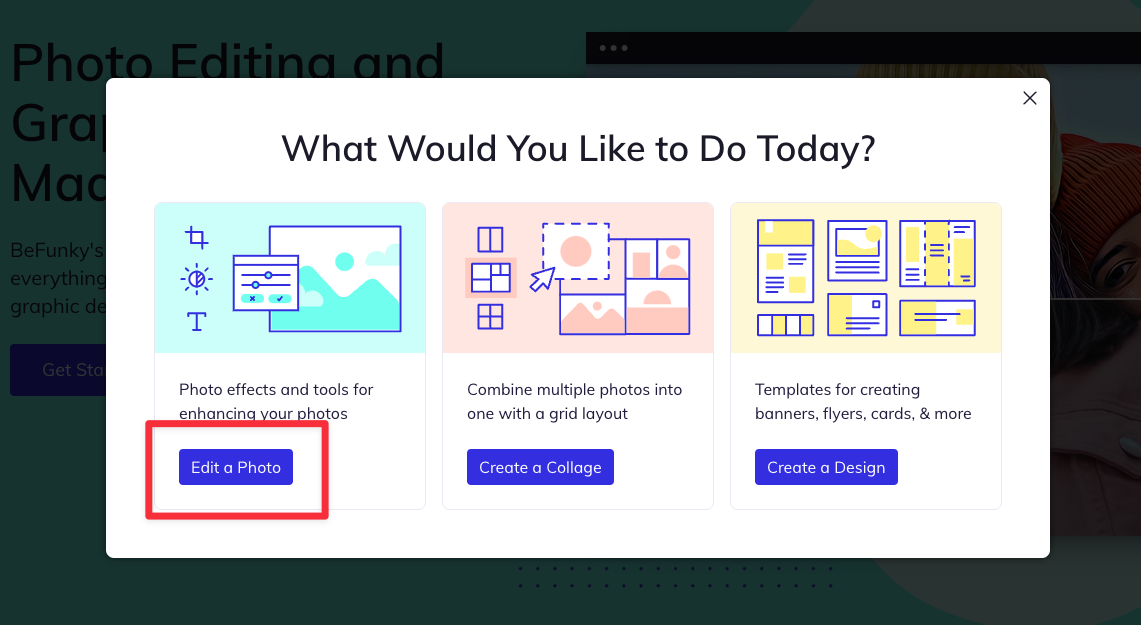
**Step 1:** Go to [befunky.com](https://www.befunky.com/) \> Get Started \> Edit a Photo
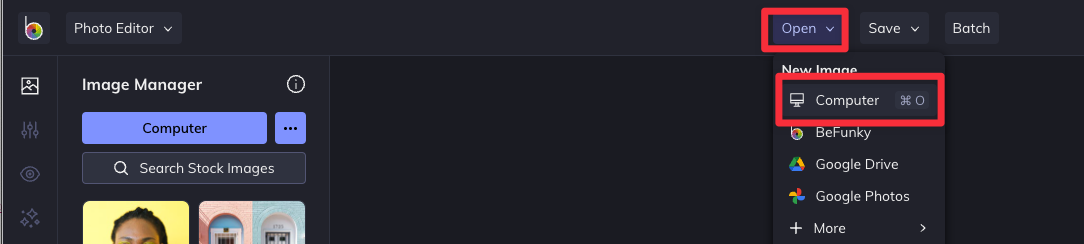
**Step 2:** Find + choose the image you want to resize from your computer
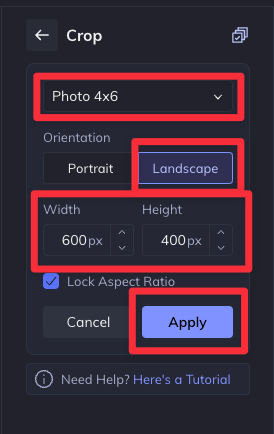
**Step 3**: Edit \> Crop
- **Ratio:** Photo 4x6
- **Orientation:** Landscape
- **Size:** Width 600 px | Height 400 px
- **Apply**
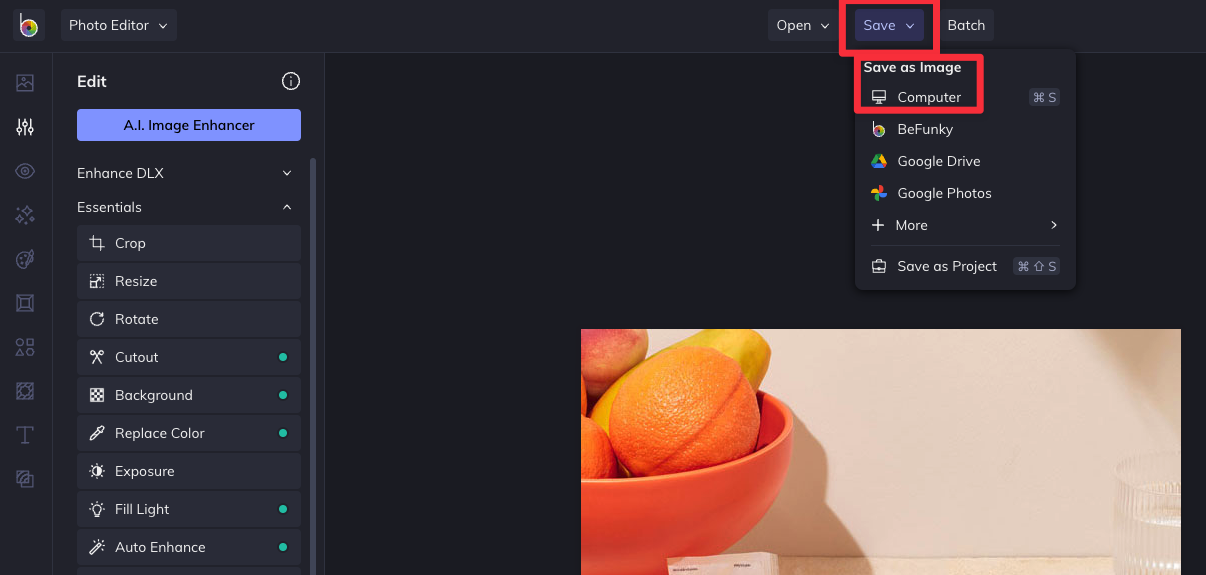
**Step 4:** Save to your computer
- **Filename:** Edit the filename (for SEO reasons, it's a great idea to save the file by your Company Name)
- **Format:** JPG
- **Quality:** Under 100kb is ideal
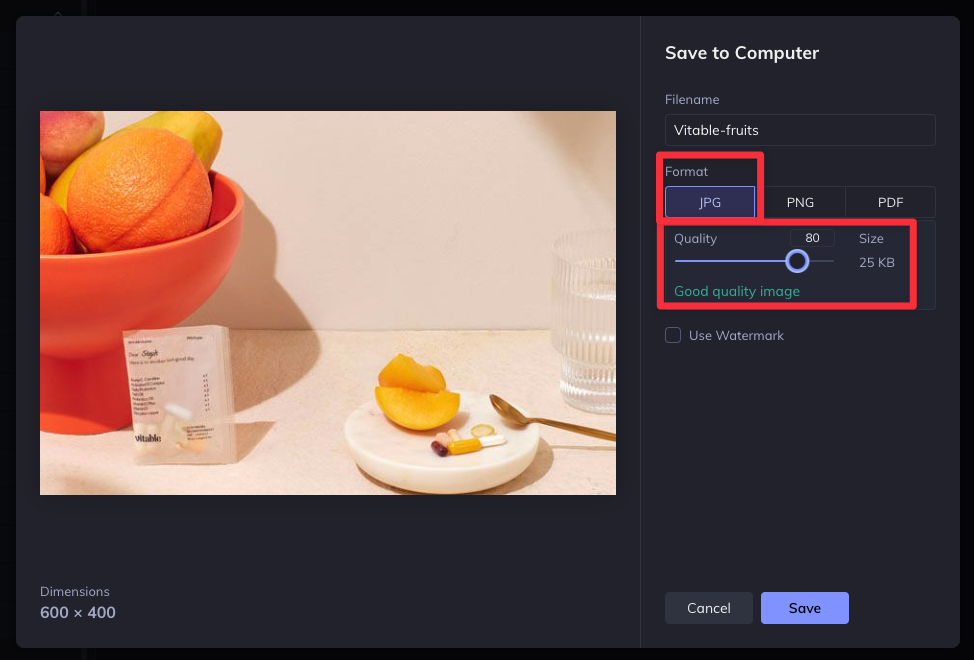
Repeat the process for all the photos you want to upload to your listing, and save them in the same folder so they are easy to upload.
When you have your images ready, you can now log in and edit your listing!
- [How to upload images to your Directory](https://help.northshoremums.com.au/knowledge/directory-images?hsLang=en)
- [How can I update my listing in the Directory?](https://help.northshoremums.com.au/knowledge/update-directory?hsLang=en)
- [Facebook Group](https://help.northshoremums.com.au/knowledge/facebook-group?hsLang=en#main-content)
- [Group Guidelines](https://help.northshoremums.com.au/knowledge/facebook-group?hsLang=en#group-guidelines)
- [Connect with us](https://help.northshoremums.com.au/knowledge/facebook-group?hsLang=en#connect-with-us)
- [Anonymous Posts](https://help.northshoremums.com.au/knowledge/facebook-group?hsLang=en#anonymous-posts)
- [Business Hour](https://help.northshoremums.com.au/knowledge/business-hour?hsLang=en)
- [Directory](https://help.northshoremums.com.au/knowledge/directory?hsLang=en#main-content)
- [Getting started with a listing in the Directory](https://help.northshoremums.com.au/knowledge/directory?hsLang=en#getting-started-with-a-listing-in-the-directory)
- [Tips for your Directory Listing](https://help.northshoremums.com.au/knowledge/directory?hsLang=en#tips-for-your-directory-listing)
- [Payment](https://help.northshoremums.com.au/knowledge/directory?hsLang=en#payment)
- [Advertising](https://help.northshoremums.com.au/knowledge/advertising?hsLang=en#main-content)
- [Advertising Options](https://help.northshoremums.com.au/knowledge/advertising?hsLang=en#advertising-options)
- [Reach & Readership](https://help.northshoremums.com.au/knowledge/advertising?hsLang=en#reach-readership)
- [Articles](https://help.northshoremums.com.au/knowledge/advertising?hsLang=en#articles)
- [What's On](https://help.northshoremums.com.au/knowledge/whats-on?hsLang=en)
- [Registration & Login](https://help.northshoremums.com.au/knowledge/registration-login?hsLang=en)
- [Website](https://help.northshoremums.com.au/knowledge/website?hsLang=en)
[](https://www.northshoremums.com.au/)
North Shore Mums Help Centre
Copyright © 2026, North Shore Mums